Mi Digital Udyojak Technology 7 video editing company mistakes to avoid early?

7 video editing company mistakes to avoid early?

In today’s digital world, every brand, influencer, and business depends on video content to connect with audiences, tell stories, and drive results. From social media clips to corporate films, video is at the heart of digital marketing success. That’s why choosing the right video editing company can make or break your brand’s visual presence. However, many companies—especially new or small-scale video editors—make avoidable mistakes early on that cost them time, money, and clients.

Whether you’re running a growing video editing company or planning to start one, understanding these common pitfalls will help you build credibility, efficiency, and long-term success. This guide highlights seven critical mistakes most video editing firms make and how to avoid them before they damage your business reputation.


Mistake #1: Ignoring the Importance of a Clear Brand Identity

One of the first mistakes a video editing company makes is failing to establish a unique and recognizable brand identity. Many companies jump straight into client projects without defining their brand voice, niche, or value proposition.

Brand identity goes beyond a logo or website. It defines how your company communicates, what kind of clients you attract, and how people perceive your services. Without a strong brand, your video editing company blends into a crowded market filled with freelancers and agencies offering similar services.

How to Fix It:

  • Define your niche early. Are you focusing on weddings, commercials, YouTube videos, or corporate films?

  • Create a consistent visual style—colors, typography, and tone.

  • Showcase your personality in every project, website page, and communication.

  • Build a tagline or mission statement that reflects your promise.

When clients can instantly recognize your brand identity, they are more likely to trust your expertise and return for repeat business.


Mistake #2: Overpromising and Under-Delivering

Another major trap for new companies is overpromising. Many new editing firms promise lightning-fast turnaround times, cinematic quality, or unlimited revisions just to land clients. While this might secure short-term projects, it can destroy long-term credibility.

Overpromising often leads to burnout, missed deadlines, and subpar work. When clients don’t get what they expect, they won’t just stop working with your video editing company—they’ll likely warn others too.

How to Fix It:

  • Be realistic about project timelines and resources.

  • Set clear expectations in writing, including revision limits and delivery schedules.

  • Communicate honestly about what you can and can’t do.

  • Focus on delivering consistent quality instead of unrealistic promises.

Clients appreciate honesty more than hype. When your video editing company delivers what it promises, you build trust that turns into referrals and loyal clients.


Mistake #3: Neglecting Client Communication

A successful video editing company thrives on communication. Misunderstandings about creative direction, revision limits, or project scope often lead to conflict and wasted effort. Unfortunately, many editing teams assume clients understand technical terms or video workflows—which they usually don’t.

Poor communication causes project delays, creative mismatches, and frustration for both sides. Even if your final edit is stunning, lack of communication during the process can make clients feel ignored or undervalued.

How to Fix It:

  • Schedule regular updates throughout the editing process.

  • Use project management tools like Trello or Monday to keep clients in the loop.

  • Create simple checklists and questionnaires to understand client goals before editing begins.

  • Offer short preview drafts for feedback early in the process.

A transparent workflow not only improves collaboration but also strengthens your video editing company’s professional image. Clear communication ensures both creativity and client satisfaction go hand in hand.


Mistake #4: Ignoring the Power of a Strong Portfolio

A video editing company without a strong portfolio is like a restaurant without a menu—no one knows what to expect. Many new editors hesitate to showcase their work until they feel it’s “perfect.” However, this delay prevents potential clients from trusting your skills.

Your portfolio acts as your sales pitch. It demonstrates your technical skills, creativity, and versatility. The biggest mistake is either not having one or presenting it poorly.

How to Fix It:

  • Create a website or social media profile dedicated to your portfolio.

  • Include various types of projects—short ads, vlogs, documentaries, or corporate videos.

  • Add before-and-after comparisons to show your editing process.

  • Update it regularly with your best work.

Remember, your portfolio should reflect the kind of clients you want to attract. If your video editing company wants to work with corporate clients, highlight clean, professional edits. If you’re targeting influencers or creators, showcase dynamic, trendy content.


Mistake #5: Underpricing Services

New editing companies often make the mistake of charging too little to compete with others. While low pricing might attract some clients initially, it can also lead to financial struggles and undervaluing your skills.

Clients often associate low prices with low quality. Once your video editing company sets a cheap rate, raising prices later becomes challenging. Additionally, underpricing can lead to burnout since you’ll need to take on too many projects to stay profitable.

How to Fix It:

  • Research your competitors and understand market rates.

  • Factor in your time, software costs, taxes, and revisions when setting prices.

  • Offer tiered packages (basic, standard, premium) to appeal to different budgets.

  • Highlight the value and expertise behind your pricing instead of competing solely on cost.

By positioning your video editing company as a provider of quality rather than just affordability, you attract clients who respect your work and are willing to pay for it.


Mistake #6: Not Investing in Professional Tools and Training

A video editing company relies heavily on technology. Using outdated software, slow computers, or ignoring new editing techniques limits your ability to deliver top-quality work. Many beginners start with basic setups and never upgrade, thinking skill alone is enough.

While creativity matters, clients expect technical excellence too. Poor audio quality, bad color grading, or laggy renders can ruin otherwise great content.

How to Fix It:

  • Use professional software like Adobe Premiere Pro, Final Cut Pro, or DaVinci Resolve.

  • Keep your editing hardware (CPU, GPU, RAM, and storage) up to date.

  • Take online courses to learn new editing trends and techniques.

  • Join video editing communities to stay informed about industry updates.

An investment in tools and training is an investment in your company’s future. Clients can tell when your video editing company delivers sharp, polished, and technically advanced videos.


Mistake #7: Skipping Marketing and Online Presence

Even the best video editing company will struggle to grow without visibility. Many talented editors rely solely on word-of-mouth or freelance platforms. While referrals are valuable, you need a strong online presence to attract consistent, high-paying clients.

Lack of marketing leads to missed opportunities, limited reach, and slower business growth. Without visibility, clients can’t find your services—even if you’re the best in your field.

How to Fix It:

  • Build a professional website with SEO-optimized content.

  • Post your work on social media platforms like YouTube, Instagram, and LinkedIn.

  • Create behind-the-scenes content showing your editing process.

  • Run targeted ads or collaborate with creators to showcase your skills.

Marketing doesn’t just bring clients—it builds credibility. The more visible your video editing company becomes, the easier it is to attract partnerships and long-term clients.


Bonus Tip: Ignoring Legal Agreements

A mistake many new editing companies overlook is skipping written contracts. Verbal agreements may seem convenient, but they often lead to disputes about payment, ownership rights, or project scope.

Always protect your video editing company with proper contracts that clearly define responsibilities, deadlines, and terms. Legal clarity prevents misunderstandings and ensures both parties are aligned from the start.

How to Fix It:

  • Use written agreements for every project, no matter how small.

  • Specify payment terms, delivery timelines, and revision limits.

  • Include clauses about video ownership and confidentiality.

  • Consult a legal professional to draft templates for recurring use.

Professional contracts establish trust and ensure your business runs smoothly without unnecessary conflicts.


Building Long-Term Success for Your Video Editing Company

Avoiding these early mistakes doesn’t just save your business—it sets the foundation for long-term success. Every video editing company starts small, but how you handle operations, client relationships, and branding determines how far you’ll go.

To stand out in today’s competitive landscape:

  • Focus on quality over quantity.

  • Communicate clearly and consistently.

  • Invest in learning and upgrading your equipment.

  • Market your business strategically.

  • Value your work—and charge accordingly.

A successful video editing company understands that technical skill alone isn’t enough. Professionalism, strategy, and customer experience play equally crucial roles. The companies that balance creativity with business sense are the ones that thrive long-term.


Conclusion

Running a video editing company can be incredibly rewarding—but only if you approach it with the right mindset and structure. The most common mistakes—like poor branding, bad communication, and underpricing—are all avoidable with planning and awareness.

Each project you take on is an opportunity to strengthen your skills, reputation, and client base. Prioritize clear communication, continuous learning, and honest delivery. Invest in tools and marketing that help your brand stand out. Most importantly, understand your value and never compromise quality for short-term gains.

By avoiding these seven mistakes early, your video editing company can grow into a trusted, respected name in the industry. Success in video editing isn’t about having the fanciest equipment or the biggest clients—it’s about consistency, professionalism, and passion for storytelling. Build wisely, work strategically, and your company will not just survive—it will shine.

Leave a Reply

Your email address will not be published. Required fields are marked *

Related Post

KMSPico Portable Version Download – Activate Windows Offline Without Installation or ErrorsKMSPico Portable Version Download – Activate Windows Offline Without Installation or Errors

In today’s technology-driven world, having fully functional Windows and Office software is essential for work, study, and personal projects. Many users struggle with license limitations or costly subscription fees, which can hinder productivity and access to essential features. Thankfully, kmspico download windows activate provides a simple and reliable solution to activate your Windows and Office software for free. By visiting our website, users can safely access the official KMSpico download, ensuring a secure installation without worrying about malware or compatibility issues. Our platform guides users through every step, allowing everyone to enjoy a fully activated system in just a few minutes.

Getting started with kmspico download windows activate is easier than ever. First, visit our website to access the trusted download link for the latest version of KMSpico. It is important to download the software from verified sources to avoid potential security risks. After downloading, temporarily disable Windows Defender or any antivirus programs, as KMSpico needs access to system files to complete activation. Following the installation instructions carefully, including running the software as an administrator and restarting your computer, ensures that Windows and Office are fully activated and ready to use with all features unlocked.

KMSpico supports multiple versions of Windows, including Windows 7, 8, 10, and 11. For users with Windows 11, KMSpico 11.2.1 offers full compatibility with the latest system updates and security enhancements. The installation process is straightforward: download the correct version for your operating system, run it as an administrator, and follow the on-screen prompts. Restarting the computer finalizes the activation process, and your system is fully functional. The developers continuously update KMSpico to maintain compatibility with new Windows releases, making it a reliable solution for long-term use.

Safety is a priority when using kmspico download windows activate. Always download KMSpico from a trusted or official website to reduce the risk of virus infections. Temporarily pausing antivirus protection during installation is necessary, but once activation is complete, security measures can be re-enabled without affecting functionality. Selecting the correct version for your operating system is crucial, as using an incompatible version may result in activation failure. Avoid running the software unnecessarily after activation, as it can interfere with the activation status. Following these safety measures ensures a smooth and secure experience with KMSpico.

The convenience of kmspico makes it an ideal choice for users worldwide. Unlike traditional activation methods that require expensive licenses or complex procedures, KMSpico simplifies the process into just a few steps. It is lightweight, efficient, and can even be removed after activation while retaining the activated status. This makes it perfect for students, professionals, and casual users who need reliable access to a fully functional Windows operating system and Office suite. With KMSpico, users save time, avoid technical complications, and gain immediate access to premium features.

In conclusion, kmspico download windows activate is the ultimate solution for anyone seeking a cost-effective, reliable, and secure way to activate Windows and Office software. Our website provides a safe platform to download KMSpico and step-by-step guidance to ensure a smooth installation and activation process. By following the instructions carefully and taking the recommended precautions, users can enjoy all the benefits of a fully activated system without the cost or hassle of traditional licenses. Visit our site today to download kmspico download windows activate and take full control of your Windows and Office software with ease and confidence.

How Instagram video downloader works online?How Instagram video downloader works online?

In today’s digital era, social media has become an essential part of our daily lives. Instagram, one of the most popular platforms, allows users to share photos and videos with friends, followers, and the world.

However, sometimes you might come across a video on Instagram that you want to save and watch later. This is where online Instagram video downloaders come in handy. Among these tools, instatik has emerged as a reliable solution for quickly and safely downloading Instagram videos.

In this blog, we will explore how Instagram video downloaders work online, the technologies behind them, their benefits, and tips for safe usage.


Instagram Videos

Before diving into how Instagram video downloaders work, it’s important to understand how Instagram stores and delivers videos.

Instagram videos are not just ordinary files stored on your device. When a user uploads a video, Instagram compresses it and stores it on its servers in a specific format. This ensures that videos load quickly, even on slower internet connections. Videos can appear in multiple forms on Instagram:

  • Feed videos: Standard videos posted on your timeline.

  • Stories: Temporary videos that disappear after 24 hours.

  • Reels: Short, entertaining videos designed for viral sharing.

  • IGTV: Longer-form videos for more in-depth content.

Each type of video is stored differently and may have different access restrictions. Instagram’s servers do not allow users to download videos directly, which is why external tools like instatik are necessary.


What Is an Instagram Video Downloader?

An Instagram video downloader is a web-based tool that allows users to save Instagram videos to their devices without needing third-party software.

Tools like instatik simplify this process by providing a straightforward interface where users can paste the URL of the Instagram video they want to download. The tool then fetches the video from Instagram’s servers and generates a downloadable link.

The main features of a good Instagram video downloader include:

  • Fast download speeds: Videos should download quickly regardless of length.

  • High-quality output: Videos are downloaded in their original resolution whenever possible.

  • Compatibility: Works across devices including smartphones, tablets, and computers.

  • User-friendly interface: Easy to use even for non-technical users.

  • Safety: No malware or phishing threats during the process.


How Online Instagram Video Downloaders Work

At a basic level, an Instagram video downloader works in three main steps:

1. Fetching the Video URL

The first step in the process is obtaining the URL of the video you want to download. Every Instagram video has a unique URL, which can be copied from the Instagram app or website. For example, on a browser, you can right-click on the video and select “Copy link,” or on a mobile app, you can use the share button to copy the URL.

When you paste this URL into a tool like instatik, the downloader reads the link to identify where the video is stored on Instagram’s servers.

2. Processing the Video

Once the URL is provided, the downloader communicates with Instagram’s servers to access the video file. Instagram does not allow direct downloads, so the downloader uses a method called scraping.

Scraping is a process where the tool parses the webpage or API response to find the direct video file link. Essentially, the downloader is “reading” Instagram’s internal code to locate the video file. This is a delicate process because Instagram frequently updates its platform to prevent unauthorized downloading.

3. Generating a Download Link

After the tool locates the video file, it generates a temporary download link. This link is usually valid for a short period and allows the user to save the video to their device. Tools like instatik often provide options to download the video in different formats and resolutions. For example:

  • MP4 (standard video format)

  • HD quality

  • Mobile-optimized resolution

This step ensures that the video maintains its quality while being easily accessible on any device.


Technologies Behind Instagram Video Downloaders

Several technologies and techniques make online video downloaders functional:

Web Scraping

As mentioned earlier, web scraping is a key technique. Downloaders analyze the HTML, CSS, and JavaScript code of Instagram pages to locate media files. Scraping must adapt to frequent Instagram updates to stay functional.

APIs (Application Programming Interfaces)

Some advanced downloaders use Instagram APIs to fetch media content. APIs are official channels that allow software to interact with Instagram’s database. While API access can simplify video downloading, it usually requires authentication and has strict usage limits.

Cloud Servers

Many online downloaders rely on cloud servers to process requests. When a user submits a URL, the server fetches the video, processes it, and generates a download link. Cloud processing reduces the load on the user’s device and speeds up downloads.

Browser Compatibility

Online tools must be compatible with multiple browsers like Chrome, Firefox, Safari, and Edge. This ensures that users can download videos regardless of the device they use.


Benefits of Using Online Downloaders Like Instatik

Using online Instagram video downloaders offers several advantages:

Convenience

You don’t need to install additional software. Just copy the video link and paste it into the downloader. This is especially useful for people using shared or restricted devices.

Access to Offline Content

Downloading videos allows you to watch content without an internet connection. This is great for travel, areas with poor connectivity, or saving educational videos.

High-Quality Downloads

A good tool like instatik maintains video quality, ensuring that you get the best viewing experience.

Cross-Device Usage

Online downloaders are platform-independent. Whether you’re using a laptop, smartphone, or tablet, you can easily download videos without compatibility issues.


Common Use Cases

Instagram video downloaders are used for a variety of purposes:

  • Content creation: Creators can save inspirational videos for reference.

  • Education: Teachers or students may download educational content.

  • Entertainment: Fans can save favorite music videos or reels.

  • Marketing: Brands may analyze competitors’ Instagram content for strategy development.

It’s important to note that downloading videos without permission may violate Instagram’s terms of service or copyright laws. Always ensure you have the right to download and share content.


Safety Considerations

While tools like instatik are generally safe, users should follow best practices:

  • Avoid suspicious websites: Only use reputable downloaders.

  • Check for HTTPS: Ensure the site is secure to protect your data.

  • Avoid downloads with excessive ads or pop-ups: These could indicate malware.

  • Respect copyright rules: Never use downloaded videos for commercial purposes without permission.


How Instatik Simplifies the Process

Instatik is a leading online Instagram video downloader that simplifies the process with its user-friendly interface and fast performance. Here’s why it stands out:

  • Easy-to-use interface: Paste the URL and download within seconds.

  • Supports multiple formats: HD, MP4, and mobile-friendly resolutions.

  • Fast processing: Uses cloud servers for efficient video processing.

  • Safe and reliable: Regularly updated to handle Instagram changes.

By using instatik, you can save Instagram videos legally and efficiently without compromising on quality.


Step-by-Step Guide to Using Instatik

Using instatik is straightforward:

  1. Open Instagram: Navigate to the video you want to download.

  2. Copy the link: Click on “Copy Link” in the app or browser.

  3. Visit Instatik: Open the instatik website in your browser.

  4. Paste the link: Insert the copied Instagram URL in the input field.

  5. Select quality: Choose your preferred video quality.

  6. Download: Click “Download” and save the video to your device.

This process works for feed videos, reels, IGTV videos, and stories.


Alternatives to Instatik

While instatik is highly recommended, there are other online downloaders available:

  • SaveFrom.net

  • Inflact

  • 4K Stogram

  • DownloadGram

However, the performance, safety, and ease-of-use vary. Instatik remains popular due to its reliability and consistent updates.


Legal and Ethical Considerations

Downloading Instagram videos raises ethical and legal concerns. Instagram’s terms of service prohibit unauthorized distribution of content. Always:

  • Download videos only for personal use.

  • Avoid sharing downloaded videos without consent.

  • Respect creators’ intellectual property.

By following these guidelines, you can enjoy downloaded content without violating rules.


Conclusion

Online Instagram video downloaders like instatik have made it easy for users to save videos for offline use. These tools work by fetching the video URL, processing it using web scraping or APIs, and generating a downloadable link. The benefits are convenience, high-quality downloads, and cross-device compatibility. However, safety and legal considerations are crucial to ensure responsible usage.

In a world where social media content is constantly growing, tools like instatik bridge the gap between online consumption and offline enjoyment, giving users the freedom to watch and share content responsibly. By understanding how these downloaders work, users can maximize their Instagram experience while respecting creators’ rights.

La métamorphose de l’interaction francophone grâce à l’IALa métamorphose de l’interaction francophone grâce à l’IA

L’essor de l’intelligence artificielle

L’intelligence artificielle (IA) connaît une expansion sans précédent, transformant de nombreux secteurs, y compris celui de la communication. De nos jours, des outils comme ChatGPT révolutionnent la manière dont les francophones interagissent avec la technologie. En effet, la capacité d’une IA à comprendre et générer du texte dans la langue de Molière ouvre de nouvelles perspectives pour les utilisateurs.

ChatGPT en français : une innovation accessible

La plateforme https://www.chatgptfrancais.app/ met à la disposition des francophones un outil puissant, facilitant l’accès à des réponses précises et pertinentes en temps réel. Que ce soit pour des besoins professionnels, éducatifs ou quotidiens, ChatGPT offre une interface intuitive qui répond à divers besoins linguistiques. Cette innovation permet non seulement d’améliorer la productivité, mais aussi de renforcer les compétences en communication.

Un impact significatif sur la langue française

L’impact de ChatGPT ne se limite pas à la simple automatisation des réponses. Il permet également de redonner vie à la langue française en facilitant son apprentissage et en encourageant son utilisation dans des contextes variés. Les utilisateurs peuvent ainsi explorer des nuances linguistiques, enrichir leur vocabulaire et mieux comprendre la grammaire.

Perspectives d’avenir

Alors que l’intelligence artificielle continue d’évoluer, il est essentiel de considérer son rôle dans la préservation et la promotion de la langue française. L’accessibilité d’outils comme ChatGPT pourrait bien bouleverser notre rapport à l’échange linguistique, ouvrant la voie à une communication plus fluide et immersive. En somme, nous sommes à l’aube d’une nouvelle ère où l’intelligence artificielle et la langue française s’entremêlent pour créer des expériences enrichissantes et inclusives.

Transforming Quick Service Operations with Advanced POS SolutionsTransforming Quick Service Operations with Advanced POS Solutions

Understanding Quick Service POS

In the fast-paced world of quick service businesses, an efficient Point of Sale (POS) system is essential. A Quick Service POS is specifically designed to streamline operations, enabling businesses like restaurants, cafes, and food trucks to improve customer service and increase sales.

Key Benefits of Quick Service POS

A Quick Service POS offers several advantages that are crucial for businesses aiming for efficiency. Firstly, it accelerates the transaction process by allowing staff to take orders and process payments swiftly. With features such as mobile payments and digital menus, customers experience a seamless checkout process, reducing wait times and enhancing satisfaction.

Moreover, these systems often come equipped with inventory management tools, making it easier for owners to track stock levels in real-time. This capability helps prevent stockouts and overstock situations, ensuring that businesses can meet customer demand without excess waste.

Integration and Customization

Another significant advantage is the ability to integrate with various third-party applications. Whether it’s accounting software or customer relationship management (CRM) systems, a Quick Service POS can provide a holistic view of business operations. Additionally, many POS solutions offer customization options, allowing businesses to tailor the interface and features according to their specific needs.

In Summary

Investing in a Quick Service POS not only streamlines operations but also enhances customer experiences. By leveraging technology, quick service businesses can maximize their efficiency, minimize errors, and ultimately drive revenue growth. For more in-depth information on how to choose the right system for your needs, check out this resource on Quick Service POS.

Atlas Pro Ontv Pour Ache Tv, Humanoid, Mag, Malus Pumila Ios Et PlusAtlas Pro Ontv Pour Ache Tv, Humanoid, Mag, Malus Pumila Ios Et Plus

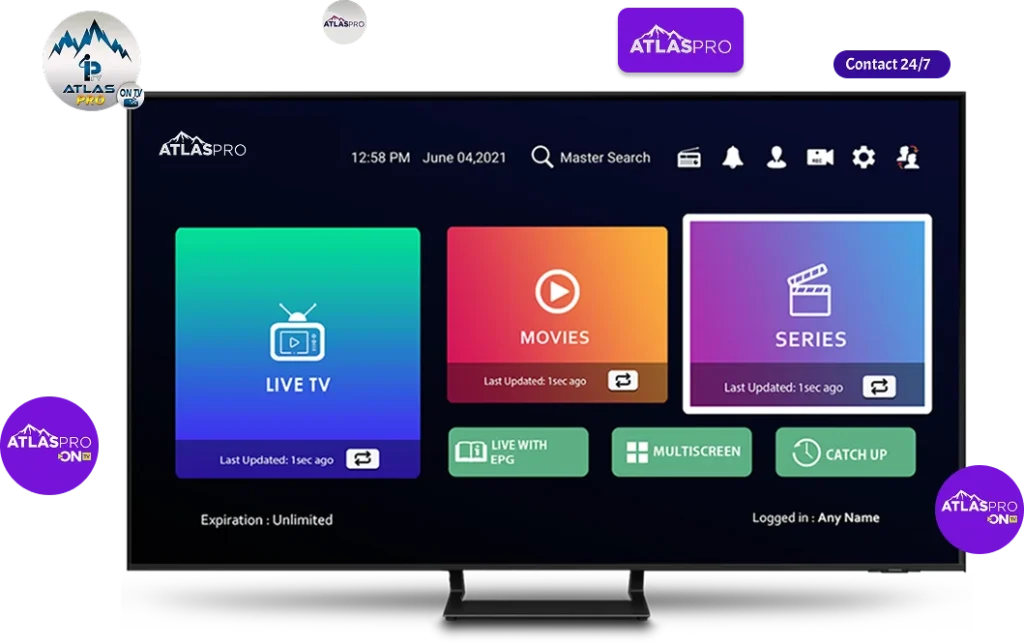
Avec l volution du cyclosis TV et des services IPTV, la compatibilit avec diff rents appareils est devenue un facteur cl pour offrir une exp rience fluide et compl te. Atlas Pro ONTV se distingue comme une root moderne, subject de fonctionner sur Smart TV, Android, MAG, Apple IOS, PC et d autres appareils, permettant chaque utilisateur de profiter de ses films, s ries et cha nes internationales pr f r es tout second et en tout lieu atlas pro.

Avec un abonnement partir de 29, Atlas Pro ONTV propose un service complet incluant vid o la demande, plus de 45 000 films et s ries, acc s toutes les cha nes internationales, stabilit serveur et support client 24 7.

1. Compatibilit tendue avec tous les appareils

Atlas Pro ONTV a t con u pour fonctionner sur une boastfully gamme d appareils afin de r pondre aux besoins de tous les utilisateurs:

    Smart TV: acc s superficial via application ou conformation URL, seafaring fluide et streaming de haute qualit.

    Android TV et Android Box: instalmen simple et rapide pour un acc s instantan aux cha nes et contenus VOD.

    MAG et Dreamlink T1: id al pour les abonn s IPTV classiques, permettant une contour rapide et un visionnage fiable.

    Apple IOS: iPhone et iPad, via application d di e ou configuration manuelle, pour profiter des films et s ries m me en d locating.

    PC via VLC et Vu KODI: parfait pour les utilisateurs qui pr f rent regarder sur ordinateur ou lecteurs multim dia avanc s.

Cette compatibilit multi-appareils garantit une exp rience TV flexible et personnalis e pour chaque utilisateur.

2. Installation simple et rapide

Atlas Pro ONTV facilite l installation sur tous les appareils:

    Sur Smart TV et Android Box, l utilisateur peut t l charger l application ou entrer l URL fournie.

    Sur MAG et Dreamlink T1, la shape se fait via le menu IPTV et l ajout du serveur Atlas Pro.

    Sur Apple IOS, il suffit d installer l application depuis l App Store et de se connecter avec les identifiants de l abonnement.

    Sur PC via VLC, l utilisateur ajoute le flux IPTV Atlas Pro pour commencer regarder ses cha nes et films.

Cette simplicit rend Atlas Pro ONTV available m me pour les d butants. La plateforme met disposition un service TV en ligne pens pour tous les profils d utilisateurs.

3. Acc s toutes les cha nes internationales

L un des principaux avantages est l acc s toutes les cha nes internationales:

    Les cha nes sont sort es par pays et par cat gorie pour une seafaring rapide.

    Acc s aux programmes d actualit s, divertissement, lark et culture du monde entier.

    Diffusion stable et fluide sur tous les appareils compatibles.

La combinaison d une user interface self-generated et d une organization claire rend la t l visual sensation en ligne plus facile que jamais.

4. Plus de 45 000 films et s ries disponibles

Atlas Pro ONTV propose un vaste catalogue de contenus en vid o la demande:

    Films r cents, s ries populaires et classiques du cin ma accessibles instantan ment.

    Mise jour quotidienne pour inclure les derni res nouveaut s et tendances.

    Organisation par genre et popularit pour faciliter la exquisite et la sailing.

La VOD offre une flexibilit totale, permettant aux utilisateurs de regarder ce qu ils veulent, quand ils le souhaitent.

5. Stabilit serveur et s curit des donn es

Une infrastructure serveur performante assure:

    Streaming fluide et sans intermission sur tous les appareils compatibles.

    Protection optimale des donn es des utilisateurs.

    Qualit constante m me pour les contenus HD et 4K.

Cette fiabilit et s curit renforcent l exp rience de visionnage et la confiance des utilisateurs.

6. Support client disponible 24 7

Atlas Pro ONTV propose un subscribe node r actif et disponible en continu:

    Assistance pour l installation et la shape sur tous les appareils.

    R root rapide des probl mes techniques.

    Conseils pour exploiter pleinement toutes les fonctionnalit s de la plateforme.

Le support assure une exp rience TV sans strain pour tous les abonn s.

7. Une exp rience TV modern et flexible

Gr ce sa compatibilit tendue, Atlas Pro ONTV transforme l exp rience de t l visual sensation domiciliate et en d location:

    Navigation facile sur tous les appareils.

    Possibilit de regarder des films et s ries en VOD ou des cha nes internationales en target.

    Flexibilit pour transcriber la t l visual sensation en ligne ses pr f rences et son emploi du temps.

Chaque utilisateur peut personnaliser son exp rience TV et profiter d un service complet et moderne.

Conclusion

Atlas Pro ONTV se distingue par sa compatibilit avec Smart TV, Android, MAG, Apple IOS, PC et d autres appareils, offrant une exp rience de cyclosis fluide, s curis e et elastic. Avec plus de 45 000 films et s ries, l acc s toutes les cha nes internationales, une infrastructure serveur stable et un support client 24 7, Atlas Pro ONTV transforme la t l visual sensation reside et en d emplacemen en une exp rience moderne et compl te.

Pour seulement 29, chaque utilisateur peut profiter d une t l vision en ligne fiable, riche en contenus et accessible sur tous ses appareils pr f r s, rendant le cyclosis simple, pratique et agr able.